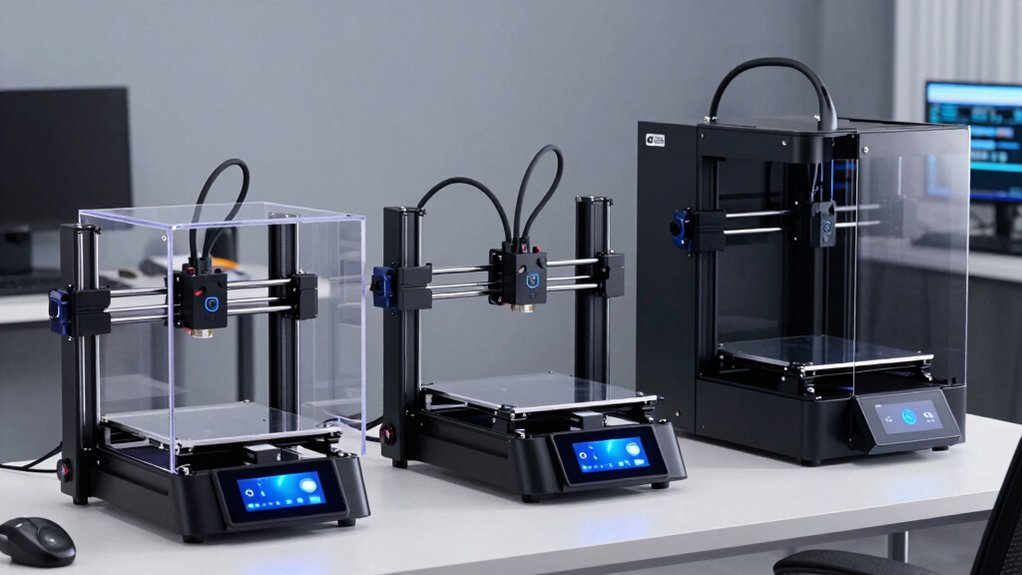

Choosing the right 3D printer in 2026 depends heavily on your specific needs—whether you’re after professional-grade performance, ease of use, or multi-material capabilities. The FLASHFORGE Creator 5 Pro stands out for industrial applications with its high-speed, multi-material setup, but it comes at a higher cost and complexity. For those seeking a versatile, user-friendly machine, the Bambu Lab P1S offers impressive multi-color printing and automation at a reasonable price. Meanwhile, the FLASHFORGE Adventurer 5M is perfect for fast prototyping with its high speed and automatic leveling, though it has mixed reviews. Each of these picks balances speed, complexity, and multi-material features differently, helping you decide based on your priorities.

Get your next haul delivered free — and shop member deals
- Fast, free delivery on millions of items
- Access to Prime Big Deal Days deals on October 6–7
- Prime Video, Amazon Music and more included
Complete the kit


Key Takeaways
- Industrial-grade models like the FLASHFORGE Creator 5 Pro excel in speed and multi-material capabilities but are costly and complex.
- Bambu Lab options prioritize ease of use, multi-color, and multi-material printing with automatic features, suitable for both beginners and pros.
- Speed is a key feature across models, with some reaching 600mm/s, but higher speeds often come with tradeoffs in stability or print quality.
- Enclosed designs improve print quality and safety but may add weight and size, affecting setup flexibility.
- Compatibility with advanced filaments like carbon fiber or glass fiber varies; most models are not suited for these materials.
| FLASHFORGE Creator 5 Pro Industrial 3D Printer |  | Best for Professional-Grade Multi-Material Printing | Active Chamber Temperature: 65°C | Air Filtration: HEPA13 | Number of Extruders: 4 | VIEW ON AMAZON | See Our Full Breakdown |
| Bambu Lab P1S 3D Printer |  | Best for Ease of Use and Multi-Color Printing | Product Dimensions: 15.31 x 18.03 x 15.31 inches | Item Weight: 38.9 pounds | Supported Filament: PLA, PETG, TPU, PVA, PET ABS, ASA; Capable: PA, PC | VIEW ON AMAZON | See Our Full Breakdown |
| FLASHFORGE Adventurer 5M 3D Printer |  | Best for Fast, Reliable Prototyping | Print Size: 220x220x220mm | Max Speed: 600mm/s | Extruder Temperature: 280°C | VIEW ON AMAZON | See Our Full Breakdown |
| Bambu Lab P2S Combo, P2S 3D Printer & AMS 2 Pro |  | Best for Professional Multi-Color, Multi-Material Printing | Product Dimensions: 18 x 22 x 18 inches | Item Weight: 46.3 pounds | VIEW ON AMAZON | See Our Full Breakdown | |
| Bambu Lab P1S Combo 3D Printer with AMS |  | Best for Beginners and Quick Setup Multi-Color | Colors: Up to 16 | Max Speed: 500mm/s | Enclosure: Fully enclosed | VIEW ON AMAZON | See Our Full Breakdown |
| 3d printer | Item Weight |
|---|---|
| FLASHFORGE Creator 5 Pro Indus | — |
| Bambu Lab P1S 3D Printer | 38.9 pounds |
| FLASHFORGE Adventurer 5M 3D Pr | 22 pounds |
| Bambu Lab P2S Combo | 46.3 pounds |
| Bambu Lab P1S Combo 3D Printer | — |
More Details on Our Top Picks
FLASHFORGE Creator 5 Pro Industrial 3D Printer
The FLASHFORGE Creator 5 Pro stands out for its industrial capabilities with four independent extruders, supporting complex multi-material and multi-color projects. Its high speed of 600mm/s makes it ideal for rapid prototyping and production environments. The active heated chamber up to 65°C and HEPA13 air filtration create a safer, cleaner environment, crucial for professional settings. However, the setup can be complex, requiring some technical knowledge, and its price reflects its high-end features, making it less suitable for casual hobbyists. Compared to the Bambu Lab models, it offers more robust multi-material support but sacrifices ease of use and affordability.
Pros:- Supports multi-material and multi-color printing with independent extruders
- High-speed printing at 600mm/s
- Effective air filtration and sealed enclosure
- Automatic calibration and tool-less nozzle changes
Cons:- Complex setup requiring technical expertise
- High cost for advanced features
Best for: Professional engineers and educational institutions needing multi-material, high-speed production
Not ideal for: Beginners or hobbyists seeking simple, plug-and-play solutions
- Active Chamber Temperature:65°C
- Air Filtration:HEPA13
- Number of Extruders:4
- Build Volume:256mm³
- Max Printing Speed:600mm/s
- Display:4-inch full-color touchscreen
Our verdict“This model is best suited for professional environments that demand rapid, multi-material, high-quality output, despite its higher complexity and investment.”
Bambu Lab P1S 3D Printer
The Bambu Lab P1S makes a compelling case for those wanting multi-color and multi-material printing without complex setups. Its automatic bed leveling, enclosed design, and support for a wide range of filaments make it accessible for beginners, yet powerful enough for experienced users. The high-speed performance up to 500mm/s means faster turnaround times, but the need to connect the optional Bambu Lab AMS for full multi-color functionality can add complexity and cost. Compared with the FLASHFORGE models, it offers a more user-friendly experience but slightly less raw speed and multi-material flexibility without the AMS upgrade.
Pros:- Vibrant multi-color/multi-material capabilities
- Automatic bed leveling
- Enclosed design improves print quality
- Supports various filament types
Cons:- Requires Bambu Lab AMS for full multi-color support
- Relatively heavy at 38.9 pounds
- Limited support for reinforced filaments
Best for: Hobbyists and pros looking for straightforward multi-material and multi-color printing
Not ideal for: Users needing support for advanced composite filaments like carbon fiber
- Product Dimensions:15.31 x 18.03 x 15.31 inches
- Item Weight:38.9 pounds
- Supported Filament:PLA, PETG, TPU, PVA, PET ABS, ASA; Capable: PA, PC
- First Available:August 15, 2025
Our verdict“The P1S is ideal for those seeking a reliable, easy-to-use multi-color printer that balances speed with convenience, though it requires upgrades for full multi-material flexibility.”
FLASHFORGE Adventurer 5M 3D Printer
The Adventurer 5M is designed for quick, reliable printing with speeds up to 600mm/s and automatic bed leveling. Its durable all-metal CoreXY structure offers stability, and its quick warm-up times reduce waiting. The variety of nozzle options allows for different filament types and nozzle sizes, making it versatile for various projects. Compared with the other models, it emphasizes speed and reliability but may require a learning curve for optimal use and space considerations due to its size.
Pros:- Automatic bed leveling
- High-speed printing at 600mm/s
- Remotely monitor via mobile app
- Versatile nozzle options
Cons:- Mixed customer reviews
- Relatively large footprint
- Some users may find advanced features complex
Best for: Prototypers and educators needing fast, consistent results
Not ideal for: Hobbyists seeking straightforward, beginner-friendly machines
- Print Size:220x220x220mm
- Max Speed:600mm/s
- Extruder Temperature:280°C
- Item Weight:22 pounds
Our verdict“Best for fast-paced environments where speed and consistent quality matter most, despite some concerns over reliability and learning curve.”
Bambu Lab P2S Combo, P2S 3D Printer & AMS 2 Pro
The P2S Combo offers a robust, high-speed solution with automatic calibration and the added benefit of the AMS 2 Pro for seamless multi-material, multi-color printing. Its quick setup, built-in filament drying, and airflow management make it suitable for both hobbyists and professionals. Its 600mm/s speed and 16-color palette provide vibrant, detailed prints, but the system’s weight and size could pose space challenges. Compared with the P1S, it provides more integrated multi-material support with the same speed advantage, making it a flexible choice for advanced workflows.
Pros:- High-speed printing up to 600mm/s
- Automatic calibration and quick setup
- Supports multi-color and multi-material with AMS 2 Pro
- Built-in filament drying system
Cons:- Heavy and large footprint
- Requires AMS for multi-color full capability
- Higher price point
Best for: Professional studios and serious hobbyists requiring multi-material flexibility
Not ideal for: Those with limited space or needing a lightweight, portable machine
- Product Dimensions:18 x 22 x 18 inches
- Item Weight:46.3 pounds
- Supported Filaments:Wide range including PLA, PETG, TPU, PVA, PET, ABS, ASA
Our verdict“This model suits demanding multi-material workflows, especially for users who value speed and automation over portability.”
Bambu Lab P1S Combo 3D Printer with AMS
The P1S Combo emphasizes simplicity and speed, offering automatic bed leveling and fast setup within 15 minutes. Its ability to produce up to 16 colors and support for various filaments makes it a versatile choice for newcomers and experienced users alike. The fully enclosed design enhances safety and print quality, though it is not compatible with carbon or glass fiber-reinforced materials. Compared to other P1S models, this combo offers an excellent balance of ease, speed, and multi-color capability, making it ideal for those just starting or wanting rapid turnaround.
Pros:- Automatic bed leveling
- Supports up to 16 colors
- Fast setup and high-speed printing
- Enclosed for safety and quality
Cons:- Limited support for reinforced filaments
- Requires AMS for full multi-color operation
Best for: Beginners and educators needing quick, colorful prototypes
Not ideal for: Users requiring advanced composite filament support
- Colors:Up to 16
- Max Speed:500mm/s
- Enclosure:Fully enclosed
- Auto Bed Leveling:Yes
Our verdict“The P1S Combo offers a straightforward, fast, and colorful printing experience, especially suitable for newcomers or educational settings.”
How We Picked
Our selection process focused on balancing performance, versatility, ease of use, and value for money. We prioritized models with high-speed capabilities, multi-material or multi-color features, and safety or automation options. We also considered user reviews and manufacturer reputations to ensure reliability. For each product, we examined the technical specs, setup complexity, and suitability for different user needs—ranging from hobbyists to industrial users—so you can find a model that aligns with your skill level and project demands.
Factors to Consider When Choosing 3d Printers
Choosing the right 3D printer depends on your specific needs, skill level, and project scope. Key factors include speed, multi-material capabilities, ease of use, and size. The right fit for a professional workshop might differ significantly from what a hobbyist needs. Below, I break down the main features to consider, helping you identify which model aligns best with your goals.
Performance and Speed
If rapid prototyping or high-volume production is your priority, look for models boasting speeds of 500mm/s or more. However, keep in mind that higher speeds can sometimes compromise print stability and quality, especially with complex geometries. Balance your need for speed with the machine’s ability to maintain precision.
Multi-Material and Multi-Color Capabilities
For intricate designs requiring multiple colors or materials, choose printers with independent extruders or integrated multi-material systems. The FLASHFORGE Creator 5 Pro supports four extruders natively, while models like Bambu Lab P2S and P1S require optional modules. Consider whether you need full multi-material support or if multi-color printing suffices.
Ease of Use and Setup
Beginners should prioritize automated features such as auto bed leveling, quick setup, and user-friendly interfaces. The Bambu Lab P1S and P1S Combo excel here, offering fast, straightforward setup. Advanced models like the Creator 5 Pro require more technical knowledge but provide greater control for professional applications.
Size and Space
Evaluate your available workspace—larger, enclosed machines offer stability and safety but demand more room. The Adventurer 5M and P1S are relatively compact, making them suitable for smaller studios or home offices, unlike bulkier industrial models.
Filament Compatibility
Most models support common filaments like PLA and PETG, but if you plan to print with reinforced or specialty filaments, confirm compatibility. Many high-performance models avoid supporting carbon fiber or glass fiber due to nozzle wear and safety concerns.
Frequently Asked Questions
What is the main difference between industrial and hobbyist 3D printers?
Industrial 3D printers, like the FLASHFORGE Creator 5 Pro, typically offer higher speeds, multi-material support, larger build volumes, and advanced safety features. In contrast, hobbyist models focus on ease of use, affordability, and smaller sizes, often sacrificing speed and multi-material capabilities for simplicity and accessibility.
Are high speeds like 600mm/s practical for detailed prints?
While higher speeds can reduce print times, they often challenge the printer’s stability and precision, especially for complex geometries. For detailed, high-quality results, most users prefer speeds around 100-200mm/s, but for rapid prototyping with simpler designs, speeds up to 600mm/s can be effective if the machine can maintain stability.
Do I need a multi-material printer for multi-color printing?
Not necessarily. Many multi-material printers have separate extruders, but some, like the Bambu Lab P1S and P2S, support multi-color printing through additional modules like the AMS. If you only need multi-color prints without complex material switching, a single extruder with multi-color filament is often sufficient and more affordable.
How important is auto bed leveling?
Auto bed leveling significantly simplifies setup, ensures consistent first layers, and reduces failed prints. For beginners and frequent users, this feature saves time and frustration. High-end models like the P1S and P2S include it as standard, making them more user-friendly.
Can these printers handle flexible filaments like TPU?
Most modern 3D printers support flexible filaments such as TPU, but some models with direct drive extruders tend to handle them better. Always check filament compatibility and consider extruder design—direct drive systems generally offer more reliable flexible filament printing than Bowden setups.
Conclusion
For hobbyists or those just starting out, models like the Bambu Lab P1S or P1S Combo offer easy setup and vibrant multi-color options. Small studios or professionals needing rapid prototyping will find the FLASHFORGE Adventurer 5M or Creator 5 Pro better suited, with the latter providing more advanced multi-material support. If your work demands high-speed, multi-material production, investing in the FLASHFORGE Creator 5 Pro or P2S Combo makes sense, despite their complexity. Ultimately, your choice depends on balancing speed, complexity, and intended use—select carefully to match your workflow and skill level.
Fall Picks
fall essentials
As an affiliate, we earn on qualifying purchases.